K8s Service란?
- 쿠버네티스의 네트워크를 의미
- Pod들을 묶어주는 virtual IP
- 동적으로 변하는 pod들에 고정적으로 접근 할 때 사용하는 방법을 제공
- 포드의 IP가 변동되었을때 재설정을 하지 않아야 할 필요성이 있음
- 포드가 지속적으로 생성/삭제시 IP의 지속적인 변동으로 로드밸런싱을 관리해줄 개체가 필요
- Service Type
- ClusterIP
- NodePort
- LoadBalancer
- ExternalName
Cluster IP
- ClusterIP
- Pod 그룹의 단일 진입점(Virtual IP) 생성
- default 서비스 타입 클러스터 안에서만 사용할 수 있다
- 클러스터안의 Node나 Pod에서 Cluster IP를 통해서 서비스에 연결된 Pod에 접근 할 수 있다
- 단 클러스터 외부에서는 접근 할 수 없다
Cluster IP 테스트
apiVersion: v1
kind: Service
metadata:
  name: culster-ip-service
spec:
  type: ClusterIP
  clusterIP: 10.100.0.254
  selector:
    app: webserver
#  sessionAffinity: ClientIP  #client session을 1개의 pod에 고정
  ports:
  - protocol: TCP
    port: 80
    targetPort: 80

---
apiVersion: apps/v1
kind: Deployment
metadata:
  name: deployment-nginx
  annotations:
    kubernetes.io/change-cause: version 1.20
spec:
  progressDeadlineSeconds: 2
  revisionHistoryLimit: 10
  strategy:
    rollingUpdate:
      maxSurge: 25%
      maxUnavailable: 25%
    type: RollingUpdate
  replicas: 3
  selector:
    matchLabels:
      app: webserver
  template:
    metadata:
      name: nginx-pod
      labels:
        app: webserver
        test: test_branch
    spec:
      containers:
      - name: webserver
        image: nginx:1.20
        ports:
        - containerPort: 80
 service 생성
- yaml에서 정의한 cluster ip 10.100.0.254를 vip로 가지는 service가 생성되었다
 sercice Endpoints ip확인
- service Endpoints가 pod의 IP와 연결됨을 확인 할 수 있다
- # curl 10.100.0.254:80
- service에 묶여있는 3개의 pod에 랜덤하게 요청한다(round-robin방식 X)
 scale out
- pod를 5개로 scale out시 service에도 2개의 EndPoint IP가 추가됨을 확인 할 수 았다.
 sessionAffinity 설정
- sessionAffinity를 설정하여 클라이언트의 세션을 하나의 pod로 고정시킨다
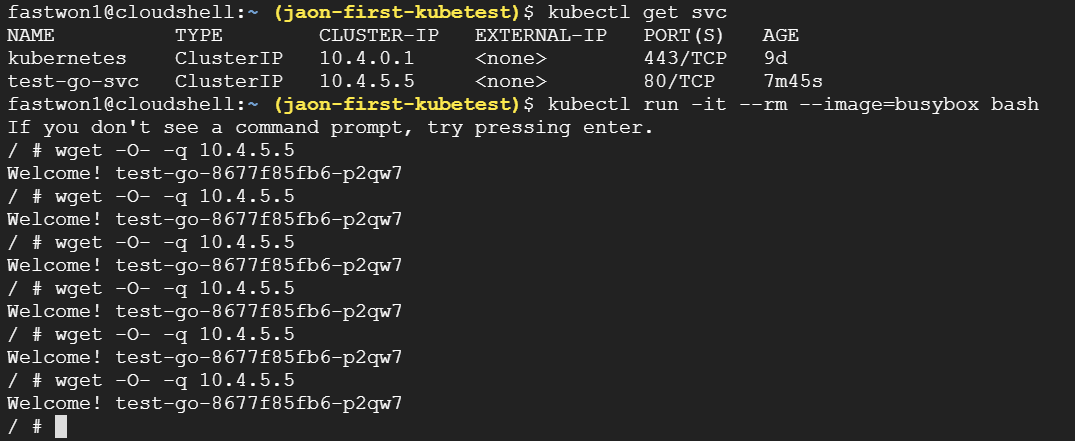 1 session에서 요청수행
- busybox를 생성하여 ClusterIP로 wget 요청을 해보자
- # kubectl run -it --rm --image=busybox bash
- # wget -O- -q 10.4.5.5
- 동일 클라이언트(동일세션) 요청을 동일 pod가 응답함을 확인할 수 있다
 session에 따른 응답
NodePort
- 서비스 하나에 모든 Node의 지정된 포트를 할당
- NodePort를 사용하면 클러스터 내부/외부에서 접근 할 수 있다
- Default NodePort 범위: 30000 - 32767
NodePort 테스트
apiVersion: v1
kind: Service
metadata:
  name: cluster-ip-service
spec:
  type: NodePort
  clusterIP: 10.100.100.254
  selector:
    app: webserver-test
  ports:
  - protocol: TCP
    port: 80
    targetPort: 80
    nodePort: 30001

---
apiVersion: apps/v1
kind: Deployment
metadata:
  name: deployment-test
  annotations:
    kubernetes.io/change-cause: version 1.20
spec:
  progressDeadlineSeconds: 2
  revisionHistoryLimit: 10
  strategy:
    rollingUpdate:
      maxSurge: 25%
      maxUnavailable: 25%
    type: RollingUpdate
  replicas: 3
  selector:
    matchLabels:
      app: webserver-test
  template:
    metadata:
      name: nginx-pod
      labels:
        app: webserver-test
    spec:
      containers:
      - name: webserver-test
        image: nginx:1.15
        ports:
        - containerPort: 80
 노드포트 생성
- # kubectl create -f ./nodePortTest.yaml
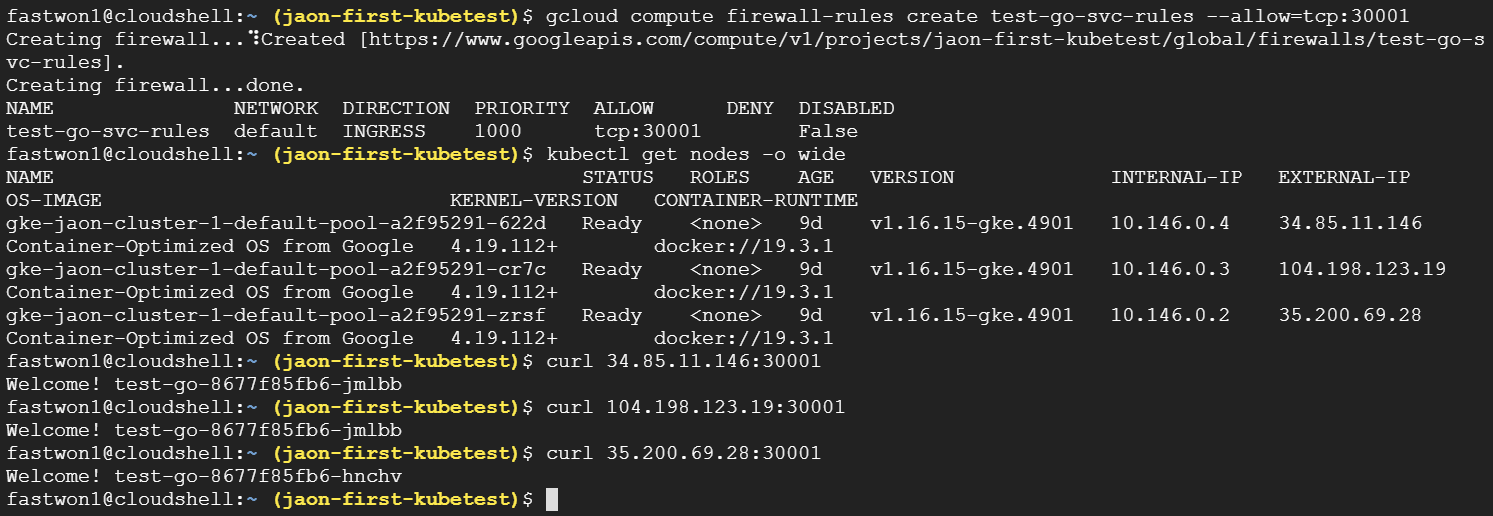 노드포트를 이용한 pod접근
- GKE에서 방화벽 해제가 필요
- # gcloud compute firewall-rules create test-go-svc-rules --allow=tcp:30001
- # kubectl get nodes -o wide
- # curl 34.85.11.146:30001
- # curl 104.198.123.19:30001
- # curl 35.200.69.28:30001
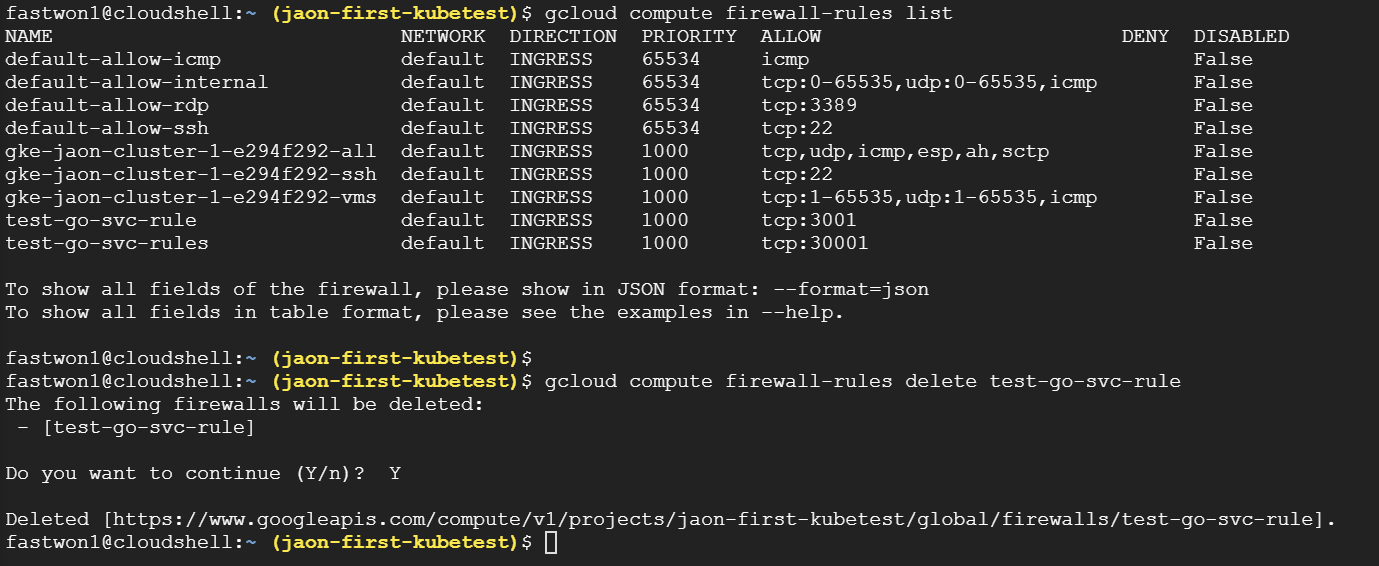 gcloud firewall rule 삭제
- # gcloud compute firewall-rules list
- # gcloud compute firewall-rules delete test-go-svc-rule
LoadBalancer
- AWS/GCP/Azure등과 같은 클라우드에서 제공하는 LoadBalancer와 pod를 연결한 후 해당 LoadBalancer IP를 이용하여 클러스터 외부에서 pod에 접근 할 수 있다
apiVersion: v1
kind: Service
metadata:
  name: loadbalancer-test
spec:
  type: LoadBalancer
  selector:
    app: test-go
  ports:
    - protocol: TCP
      port: 80
      targetPort: 8080
 로드밸런서 생성
- # kubectl create -f ./loadbalceTest.yaml
NodePort vs LoadBalancer
- NodePort는 Node의 IP를 알아야 접근이 가능하여 외부에 Node의 IP가 노출될 우려가 있다.
- LoadBalancer는 대표 IP(EXTERNAL-IP)를 통해서 pod들에 접근하여 Node의 IP가 외부에 노출되지 않는다.
- LoadBalancer는 경로를 최적화하여 구현할 수 있다.
ExternalName
- 클러스터 내부에서 외부에 접속 시 사용할 도메인을 등록해서 사용
- 클러스터 도메인이 실제 외부 도메인으로 치환되어 동작한다
ExternalName 테스트
apiVersion: v1
kind: Service
metadata:
  name: externalname-svc
spec:
  type: ExternalName
  externalName: google.com

- Pod 내부에서 ExternalName으로 google.com로 curl실행
- # curl externalname-svc.default.svc.cluster.local
- 특정 서비스에 접근하는 도메인
- 서비스이름.네임스페이스.svc.cluster.local
- 특정 Pod 접근하는 도메인
- IP주소.네임스페이스.pod.cluster.local
Headless 서비스란?
- Loadbalancing이 필요 없거나 단일 서비스 IP가 필요 없는 경우 사용
- Pod의 endpoint에 DNS resolving Service 지원
- Pod의 DNS 주소: pod-ip-addr.namesapce.pod.cluster.local
Headless 테스트
apiVersion: v1
kind: Service
metadata:
  name: headless-service
spec:
  type: ClusterIP
  clusterIP: None
  selector:
    app: webserver-test
#  sessionAffinity: ClientIP
  ports:
  - protocol: TCP
    port: 80
    targetPort: 80

---
apiVersion: apps/v1
kind: Deployment
metadata:
  name: deployment-test
  annotations:
    kubernetes.io/change-cause: version 1.20
spec:
  progressDeadlineSeconds: 2
  revisionHistoryLimit: 10
  strategy:
    rollingUpdate:
      maxSurge: 25%
      maxUnavailable: 25%
    type: RollingUpdate
  replicas: 3
  selector:
    matchLabels:
      app: webserver-test
  template:
    metadata:
      name: nginx-pod
      labels:
        app: webserver-test
    spec:
      containers:
      - name: webserver-test
        image: nginx:1.15
        ports:
        - containerPort: 80
 headless 생성
- # curl 172-16-221-172.default.pod.cluster.local
- Pod ip를 domain으로 가지는게 의미가 있나?
- service discovery 관련 공부가 필요할 듯 하다.
Kube-proxy
- K8s service의 backend 구현
- endPoint 연결을 위한 iptable rule 구성
- Cluster IP나 Node port로 접근할 수 있게 만들어 실제 조작을 하는 컴포넌트
- mode
- userspace
- 클라이언트의 서비스 요청을 iptables를 거쳐 kube-proxy가 받아서 연결
- iptables
- service API 요청시 iptables rule 생성
- 클라이언트에서 오는 모든 요청은 iptables을 거쳐서 pod로 직접 전달
- IPVS
- L4 로드밸런싱 기술을 이용
- 별도의 ipvs 지원 모듈을 설정한 후 적용 가능
인그레스란?
- 클러스터 외부에서 안으로 접근하는 요청들을 어떻게 처리할지 정의해둔 규칙의 모음
- 서비스들에 대한 단일 진입점을 구성
- 서비스에 대한 외부 URL 제공
- 트래픽 로드밸런싱
- SSL 인증 처리
- 도메인 기반 가상 호스팅 제공
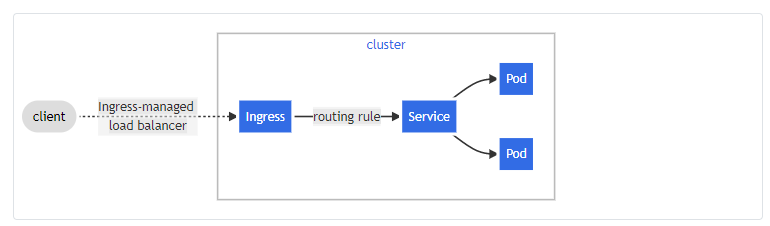
apiVersion: networking.k8s.io/v1beta1
kind: Ingress
metadata:
  name: test-go-ingress
spec:
  rules:
  - host: fastwon1.com
  - http:
      paths:
      - path: /
        backend:
          serviceName: test-go-svc
          servicePort: 80
 인그레스 조회