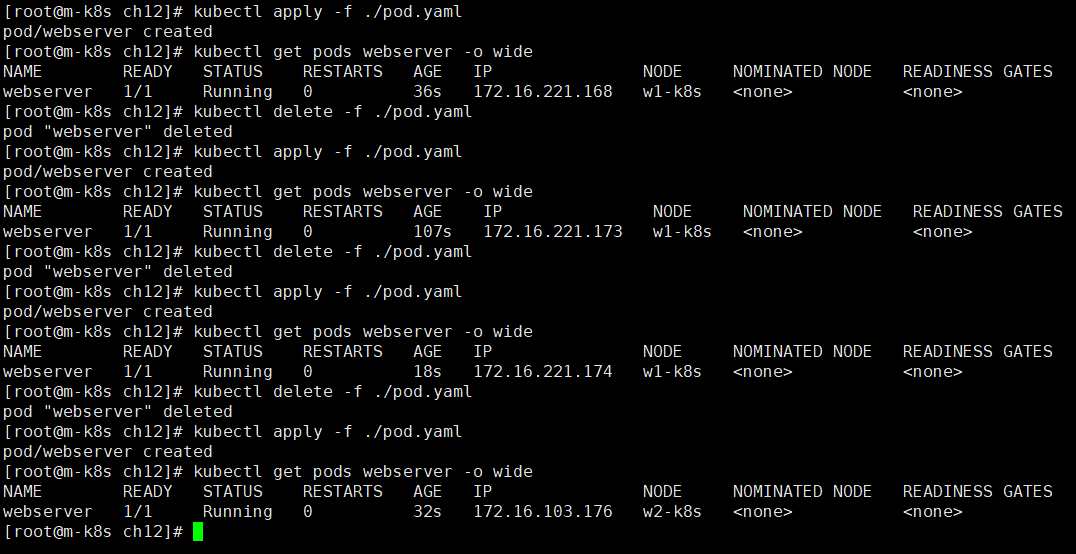
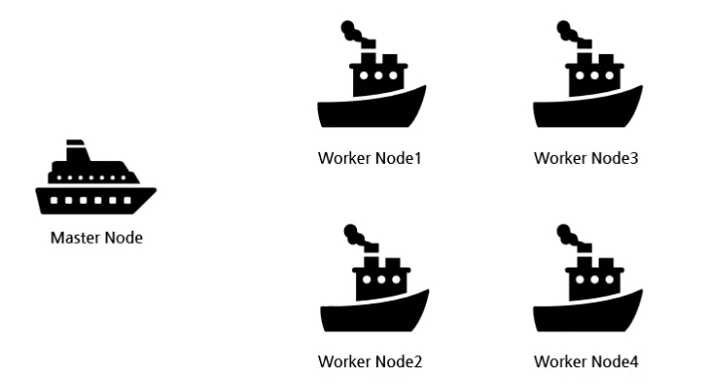
K8s는 Pod를 어떤 노드에서 실행할지에 대한 다양한 옵션이 있고 아래 4가지 방식을 지원합니다.

  • Node Selector
  • Node Affinity & pod Affinity pod antiAffinity
  • node taint & pod toleration
  • cordon & drain


Node Selector?

  • Pod가 클러스터 안 어떤 노드에서 실행될지를 Label을 이용하여 지정하는 방식


Node Selector 테스트

apiVersion: v1
kind: Pod
metadata:
  labels:
    run: webserver
  name: webserver
spec:
  containers:
  - image: nginx
    name: webserver
    ports:
    - containerPort: 80
  nodeSelector:
    cpu: "2core_over"
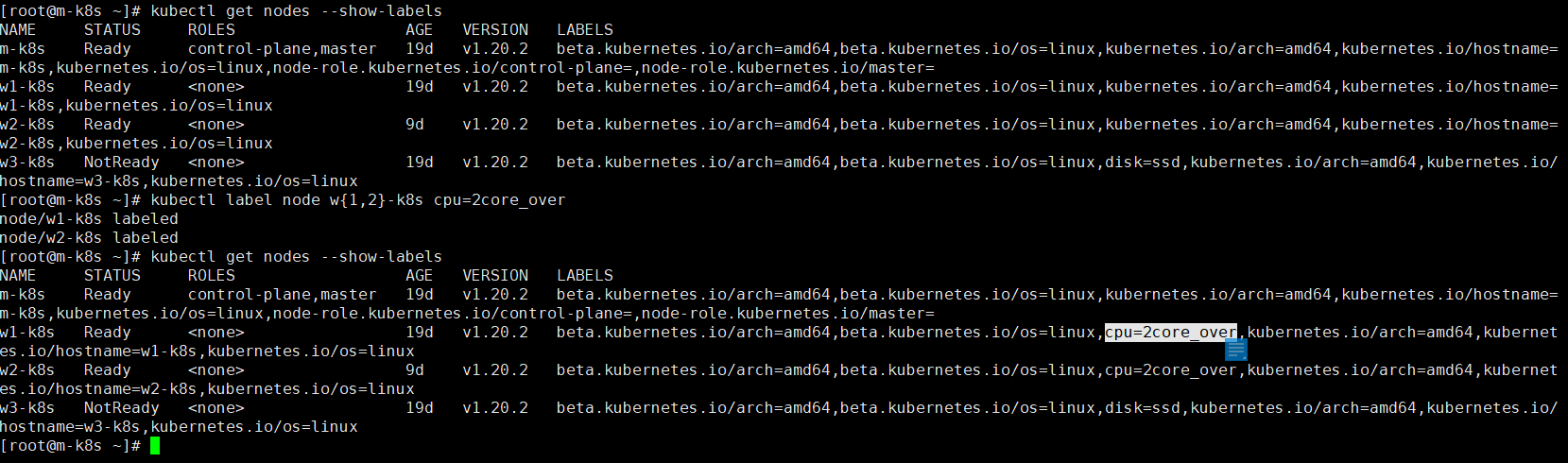
  • # kubectl label node w{1,2}-k8s cpu=2core_over
    • node 1, 2에 label 추가

  • cpu label이 지정된 노드에서만 pod가 실행됨을 확인 할 수 있다.


Node Affinity & antiAffinity?

  • Node Node Affinity
    • 특정 노드에서만 Pod가 실행되도록 하는 기능
    • Node Selector와 유사하지만 아래의 두가지 요구조건이 만족하는 Pod에만 스케줄링 하도록 지정 할 수 있습니다
      • requiredDuringSchedulingIgnoredDuringExecution
        • 스케줄링하는 동안 꼭 필요한 조건
      • preferedDuringSchedulingIgnoredDuringExecution
        • 스케줄링하는 동안 만족하면 좋은 조건
  • Pod Affinity
    • Pod들을 더 가깝게 배치하는 방법
  • Pod AntiAffinity
    • Pod들을 분산 배치하는 방법


Node Affinity 테스트

apiVersion: v1
kind: Pod
metadata:
  name: nginx-gpu-ssd
spec:
  containers:
  - name: webserver
    image: nginx:1.15
    ports:
    - containerPort: 8888
      protocol: TCP
  affinity:
    nodeAffinity:
      requiredDuringSchedulingIgnoredDuringExecution:
        nodeSelectorTerms:
        - matchExpressions:
          - {key: disktype, operator: Exists}
      preferredDuringSchedulingIgnoredDuringExecution:
      - weight: 10
        preference:
          matchExpressions:
          - {key: gpu, operator: In, values: ["true"]}
          - {key: disktype, operator: In, values: ["ssd"]}

  • w1-k8s 노드에 gpu=true cpu=2core disktype=ssd 레이블 추가
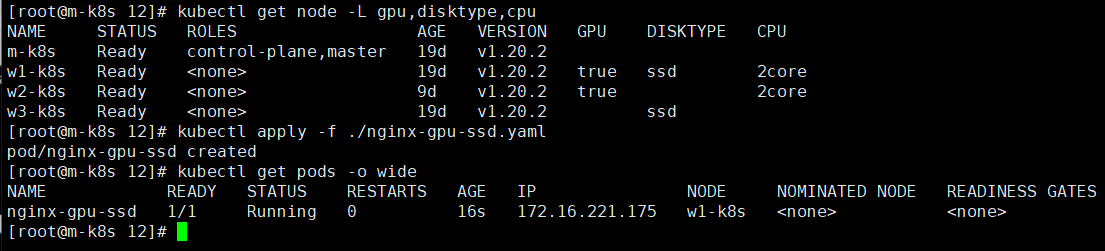
  • requiredDuringSchedulingIgnoredDuringExecution 설정에 의해서 disktype label이 존재하는 레이블 중에서 gpu가 true disktype이 ssd인 w1-k8s node가 스케줄링 되는것을 확인 할 수 있다
    • w1-k8s 가중치: 20
    • w2-k8s disktype 레이블이 없으므로 해당사항없음
    • w3-k8s 가중치: 10


Pod Affinity 테스트

apiVersion: apps/v1
kind: Deployment
metadata:
  name: frontend
spec:
  replicas: 5
  selector:
    matchLabels:
      app: frontend
  template:
    metadata:
      labels:
        app: frontend
    spec:
      affinity:
        podAffinity:
          requiredDuringSchedulingIgnoredDuringExecution:
          - labelSelector:
              matchLabels:
                app: backend
            topologyKey: kubernetes.io/hostname
      containers:
      - name: main
        image: busybox
        args:
        - sleep
        - "100000"

  • backend pod가 실행중인 w3-k8s node에서 frontend pod가 실행됨을 확인 할 수 있다


Pod AntiAffinity 테스트

apiVersion: apps/v1
kind: Deployment
metadata:
  name: frontend
spec:
  replicas: 5
  selector:
    matchLabels:
      app: frontend
  template:
    metadata:
      labels:
        app: frontend
    spec:
      affinity:
        podAntiAffinity:
          requiredDuringSchedulingIgnoredDuringExecution:
          - labelSelector:
              matchLabels:
                app: backend
            topologyKey: kubernetes.io/hostname
      containers:
      - name: main
        image: busybox
        args:
        - sleep
        - "100000"
  • topologyKey
    • 노드 label을 이용해 pod의 affinity와 antiaffinity를 설정할 수 있는 또 하나의 기준
    • K8s는 Pod를 스케줄링 할 때 먼저 Pod의 label을 기준으로 대상 노드를 찾고, topology 필드를 확인하여 해당 노드가 원하는 노드인지 확인한다.

  • backend pod가 실행중인 w1-k8s node에서 frontend pod가 실행되지 않음을 확인 할 수 있다


node taint & pod toleration

  • node taint
    • 특정 Node에 taint를 설정하여 설정한 Node에는 Pod를 스케줄링 하지 않도록 할 수 있음.
      • master node인 m-k8s에는 taint NoSchedule가 설정돼 있어 해당 Node는 스케줄링을 받지 않도록 설정되어 있다
    • toleration
      • taint를 설정한 Node에 Pod를 스케줄링하려면 toleration을 설정해아 함
      • toleration이 있는 Pod는 동일한 taint가 있는 node를 포함하여 tain가 설정돼있지 않은 모든 node에 배치된다


node taint & pod toleration 테스트

1. taint 설정되지 않는 node에만 pod 배치여부확인

apiVersion: apps/v1
kind: Deployment
metadata:
  name: weserver
spec:
  replicas: 4
  selector:
    matchLabels:
      app: webserver
  template:
    metadata:
      name: nginx-pod
      labels:
        app: webserver
    spec:
      containers:
      - name: nginx-container
        image: nginx
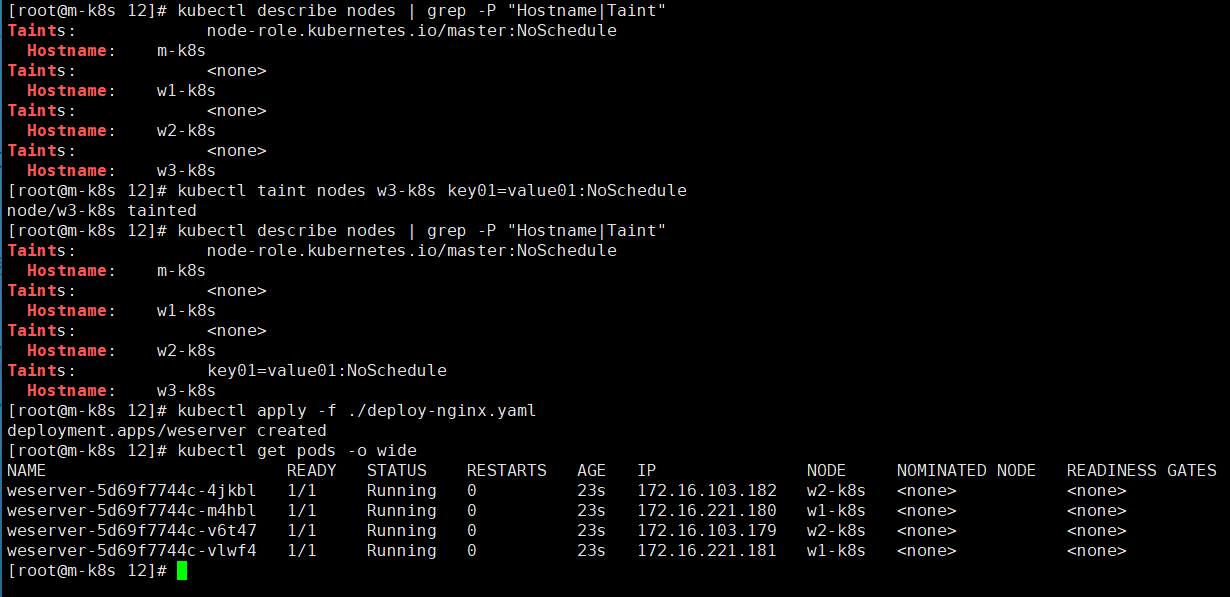
  • # kubectl taint nodes w3-k8s key01=value01:NoSchedule
    • w3-k8s Node에 taint 설정
    • 형식: kebectl taint nodes 노드이름 키=값:효과
  • taint가 설정된 m-k8s ,w3-k8s Node에는 pod가 할당되지 않음을 확인 할 수 있다


2. Pod에 toleration 설정하여(taint가 동일한 Node는 없음) Node에 Pod 배치여부 확인

apiVersion: apps/v1
kind: Deployment
metadata:
  name: weserver
spec:
  replicas: 4
  selector:
    matchLabels:
      app: webserver
  template:
    metadata:
      name: nginx-pod
      labels:
        app: webserver
    spec:
      containers:
      - name: nginx-container
        image: nginx
      tolerations:
      - key: "role"
        operator: "Equal"
        value: "web"
        effect: "NoSchedule"

  • Taint가 설정돼있지 않은 w1-k8s, w2-k8s에만 pod가 스케줄링됨을 알 수 있다


3. Pod에 toleration 설정하여(taint가 동일한 Node는 있음) Node에 Pod 배치여부 확인

apiVersion: apps/v1
kind: Deployment
metadata:
  name: weserver
spec:
  replicas: 4
  selector:
    matchLabels:
      app: webserver
  template:
    metadata:
      name: nginx-pod
      labels:
        app: webserver
    spec:
      containers:
      - name: nginx-container
        image: nginx
      tolerations:
      - key: "role"
        operator: "Equal"
        value: "web"
        effect: "NoSchedule"
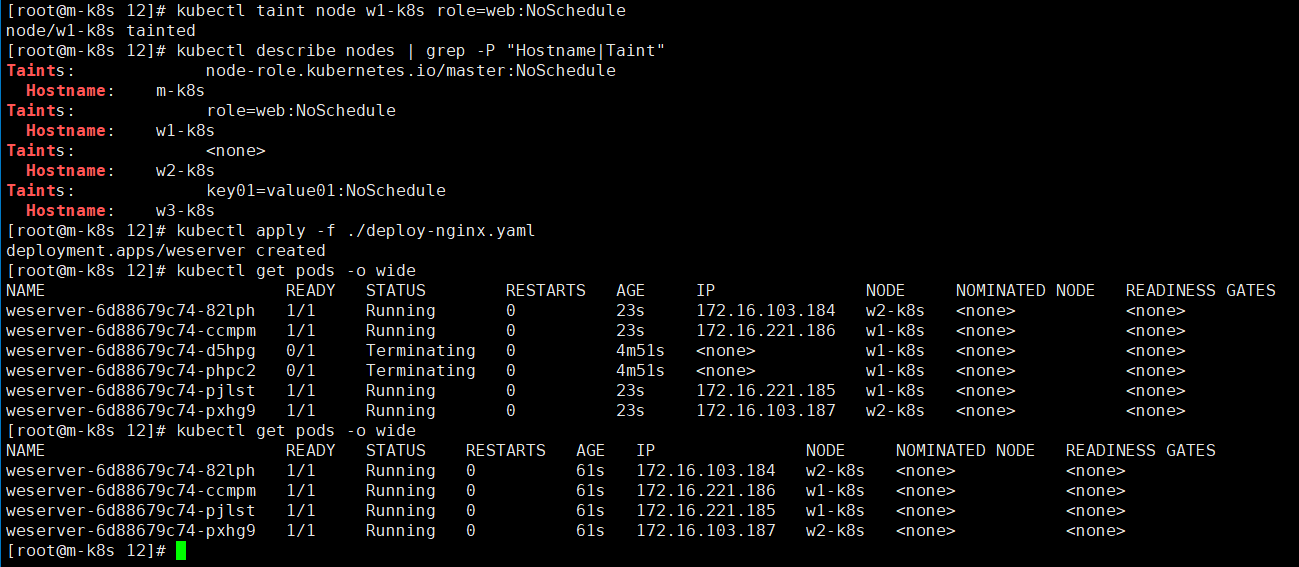
  • # kubectl taint node w1-k8s role=web:NoSchedule
    • w1-k8s Node에 taint 설정
  • taint와 tolerations이 일치하는 w1-k8s Node에 Pod가 스케줄링 됨을 확인 할 수 있다.
  • 또한 taint가 설정되지 않은 w2-k8s에 Pod에도 스케줄링 된다


4. Node에 전부 taint가 설정되어 있고 pod tolerations 설정이 맞지 않는다면?

apiVersion: apps/v1
kind: Deployment
metadata:
  name: weserver
spec:
  replicas: 4
  selector:
    matchLabels:
      app: webserver
  template:
    metadata:
      name: nginx-pod
      labels:
        app: webserver
    spec:
      containers:
      - name: nginx-container
        image: nginx
      tolerations:
      - key: "role"
        operator: "Equal"
        value: "web"
        effect: "NoSchedule"
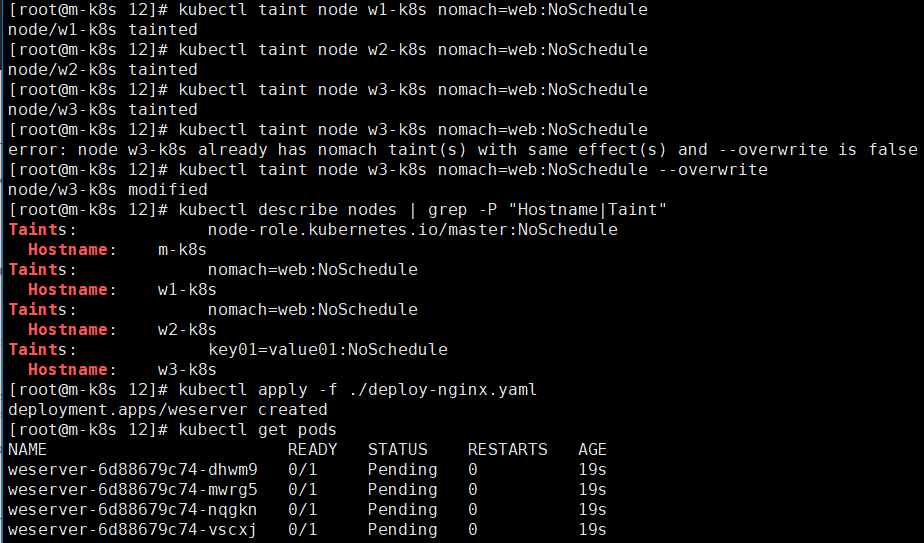
  • 모든 Node에 taint가 설정되어 있고 Pod tolerations 설정이 맞지 않는 경우 pod는 pending 상태가 된다. 


cordon & drain?

  • 특정 Node에 있는 Pod들을 모두 다른 노드로 옮기거나 특정 Node에 Pod들을 스케줄링하지 않도록 제한하는 기능
  • cordon
    • 특정 노드에 Pod 스케줄링 금지
  • uncordon
    • 특정 노드에 Pod 스케줄링 해제
  • drain
    • 특정 노드에서 동작중인 모든 Pod를 제거
      • kubectl drain Node [option]
        • option
          • --ignore-deamonsets
            • DaemonSet이 관리하는 Pod들은 ignore
          • --force
            • RC, RS, Job, DaemonSet 또는 StatefulSet에서 관리하지 않는 Pod 제거


cordon & uncordon 테스트

apiVersion: apps/v1
kind: Deployment
metadata:
  name: weserver
spec:
  replicas: 4
  selector:
    matchLabels:
      app: webserver
  template:
    metadata:
      name: nginx-pod
      labels:
        app: webserver
    spec:
      containers:
      - name: nginx-container
        image: nginx

  • # kubectl cordon w1-k8s
    • w1-k8s Node를 cordon 설정
  • w1-k8s Node에 pod가 할당되지 않음을 확인 할 수 있다
  • # kubectl uncordon w1-k8s
    • cordon 해제


drain 테스트

apiVersion: apps/v1
kind: Deployment
metadata:
  name: weserver
spec:
  replicas: 4
  selector:
    matchLabels:
      app: webserver
  template:
    metadata:
      name: nginx-pod
      labels:
        app: webserver
    spec:
      containers:
      - name: nginx-container
        image: nginx

  • w3-k8s Node에서 Controller에 의해서 관리되지 않는 db pod와 deployment에 의해서 관리되는 webserver pod가 실행중이다.
  • # kubectl drain w3-k8s --ignore-daemonsets --force
    • Controller에 의해서 관리되지 않는 db pod는 삭제되고 deployment의 관리를 받는 webserver pod는 다른 Node에서 실행됨을 확인 할 수 있다.
  • w3-k8s Node는 cordon을 했을때와 동일하게 상태가 SchedulingDisabled인것을 확인 할 수 있다.
  • static Pod는 삭제되지 않습니다.

'클라우드 > K8s' 카테고리의 다른 글

K8s volume  (0) 2022.04.03
K8s 인증과 권한관리  (0) 2022.04.03
K8s Secret  (0) 2022.03.31
K8s Configmap  (0) 2022.03.31
K8s 버전 업그레이드  (0) 2022.03.18

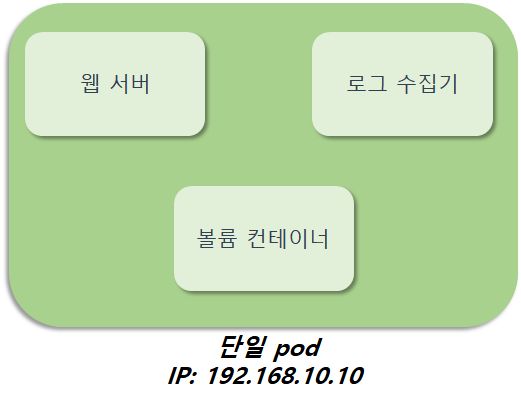
사이트카 패턴

  • 원래 사용려던 기본 컨테이너 기능 확장 또는 강화하는 용도의 컨테이너 추가
  • 멀티컨테이너 형태로 구성
    • 웹서버 컨테이너
      • 로그를 파일로 남김
    • 로그 수집 컨테이너
      • 파일시스템에 쌓이는 로그를 수집하여 외부 로그수집기로 전송


앰배서더 패턴

  • pod안에서 프록시 역할을 하는 컨테이너를 추가하는 패턴
  • 멀티컨테이너 형태로 구성
    • 앱 컨테이너
      • 외부에 접근하는 경우 앰배서더 컨테이너를 통해서 연결되도록 설정
    • 앰베서더 컨테이너
      • 프록시 또는 로드밸런서 역할 수행


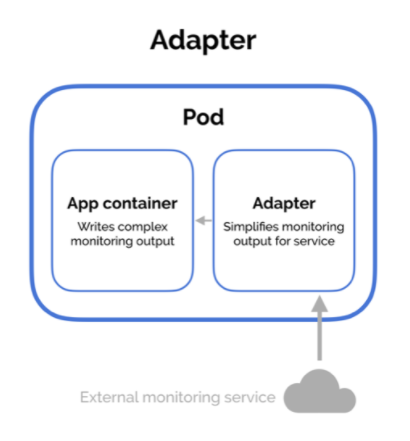
어댑터 패턴

  • pod 외부로 노출되는 정보를 표준화하는 어댑터 컨테이너를 사용
  • 멀티컨테이너 형태로 구성
    • 앱 컨테이너
      • Adapter 컨테이너가 전달한 정보를 가공하여 노출
    • 어댑터 컨테이너
      • 외부 모니터링 정보를 Adapter 컨테이너가가 받아서 앱 컨테이너에 전달
  • 프로메테우스에서 사용하는 패턴


https://matthewpalmer.net/kubernetes-app-developer/articles/multi-container-pod-design-patterns.html


Multi-Container Pod Design Patterns - CKAD Course

Multi-Container Pod Design Patterns in Kubernetes Multi-container pods are extremely useful for specific purposes in Kubernetes. While it’s not always necessary to combine multiple containers into a single pod, knowing the right patterns to adopt creates

matthewpalmer.net


'클라우드 > K8s' 카테고리의 다른 글

K8s Controller  (0) 2022.03.17
K8s namespaces  (0) 2022.03.17
POD  (0) 2022.03.17
K8s 동작원리  (0) 2022.03.17
Single Master K8s 설치 및 기본 명령어  (0) 2022.03.17

POD?

  • Container를 표현하는 k8s API의 최소단위
  • k8s가 Pod라는 단위로 컨테이너를 묶어서 관리
    • Pod와 Container 1대 다관계


POD의 생명주기

https://kubernetes.io/ko/docs/concepts/workloads/pods/pod-lifecycle/


파드 라이프사이클

이 페이지에서는 파드의 라이프사이클을 설명한다. 파드는 정의된 라이프사이클을 따른다. Pending 단계에서 시작해서, 기본 컨테이너 중 적어도 하나 이상이 OK로 시작하면 Running 단계를 통과하

kubernetes.io

  • Pending
    • K8s 시스템에 Pod를 생성하는 중인 상태
  • Running
    • 파드 안 컨테이너가 실행중인 상태
  • Succeeded
    • Pod 안의 모든 컨테이너가 정상 실행 종료된 상태
  • Failed
    • Pod 안의 모든 컨테이너 중 정상적으로 실행 종료되지 않은 컨테이너가 있는 상태
  • Unknown
    • Pod의 상태를 확인할 수 없는 상태


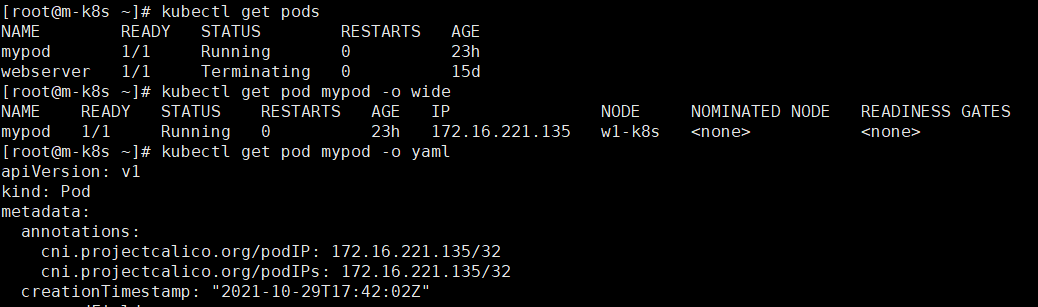
현재 동작중인 Pod 조회

pod 조회

  • # kubectl get pods
  • # kubectl get pod mypod -o wide
  • kubectl get pod mypod -o yaml
  • kubectl get pod mypod -o json


pod 생성(CLI명령어)

pod 생성 및 테스트

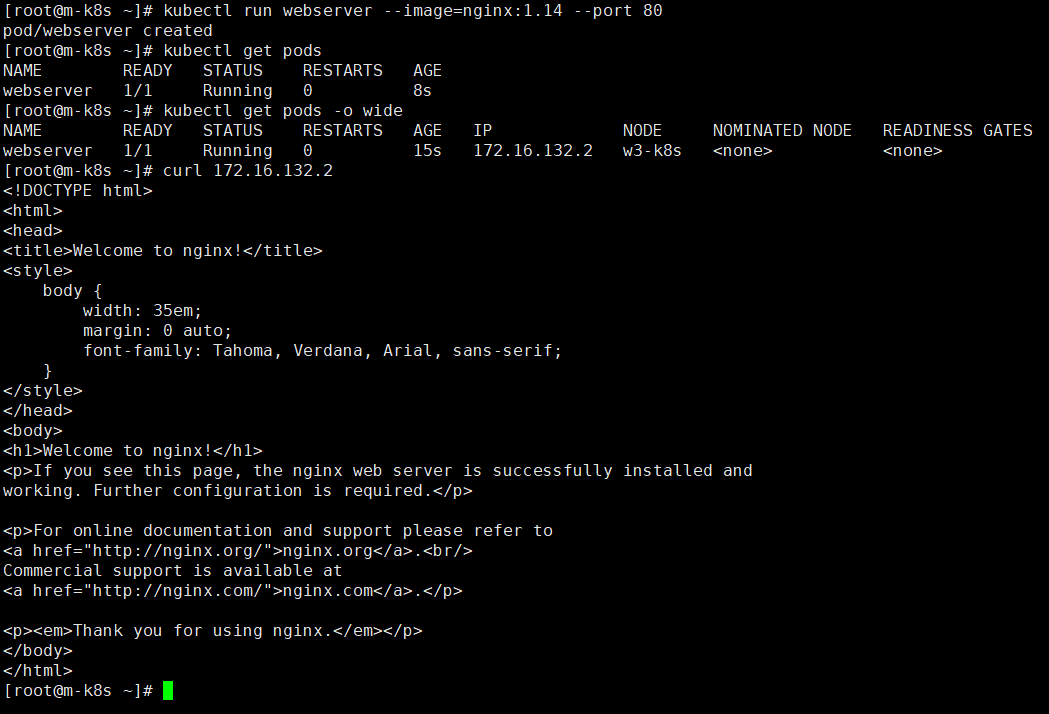
pod 생성

  • # kubectl run webserver2 --image=nginx:1.14 --port 80
    • nginx의 기본 listen port는 80

pod 조회

  • # kubectl get pods
  • # kubectl get pods -o wide
  • # kubectl get pod webserver -o yaml > test.yaml
    • yaml형식으로 test.yaml파일로 output
  • # kubectl get pod webserver -o json > test.json
    • json형식으로 test.json파일로 output
  • # kubectl get pods --all-namespaces
    • 모든 namespace에 동작중인 pod 조회

pod의 로그 출력

  • # kubectl logs webserver

테스트

  • # curl 172.16.132.2


POD생성(yaml) & 명령어 실행가능 상태 확인

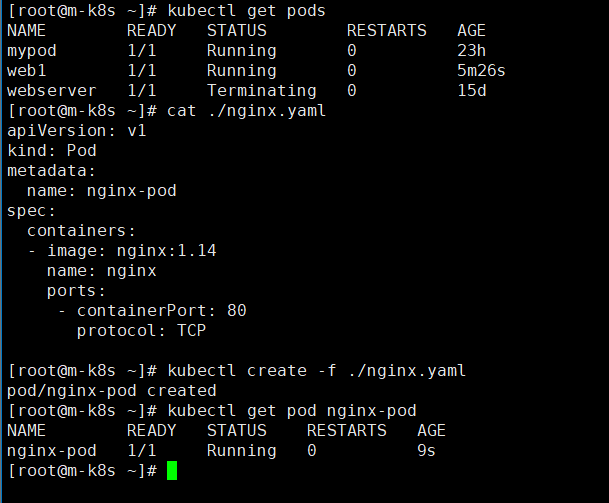
yaml파일을 이용하여 pod 생성

  • # kuctl create -f ./nginx.yaml
  • # kubectl apply -f ./nginx.yaml


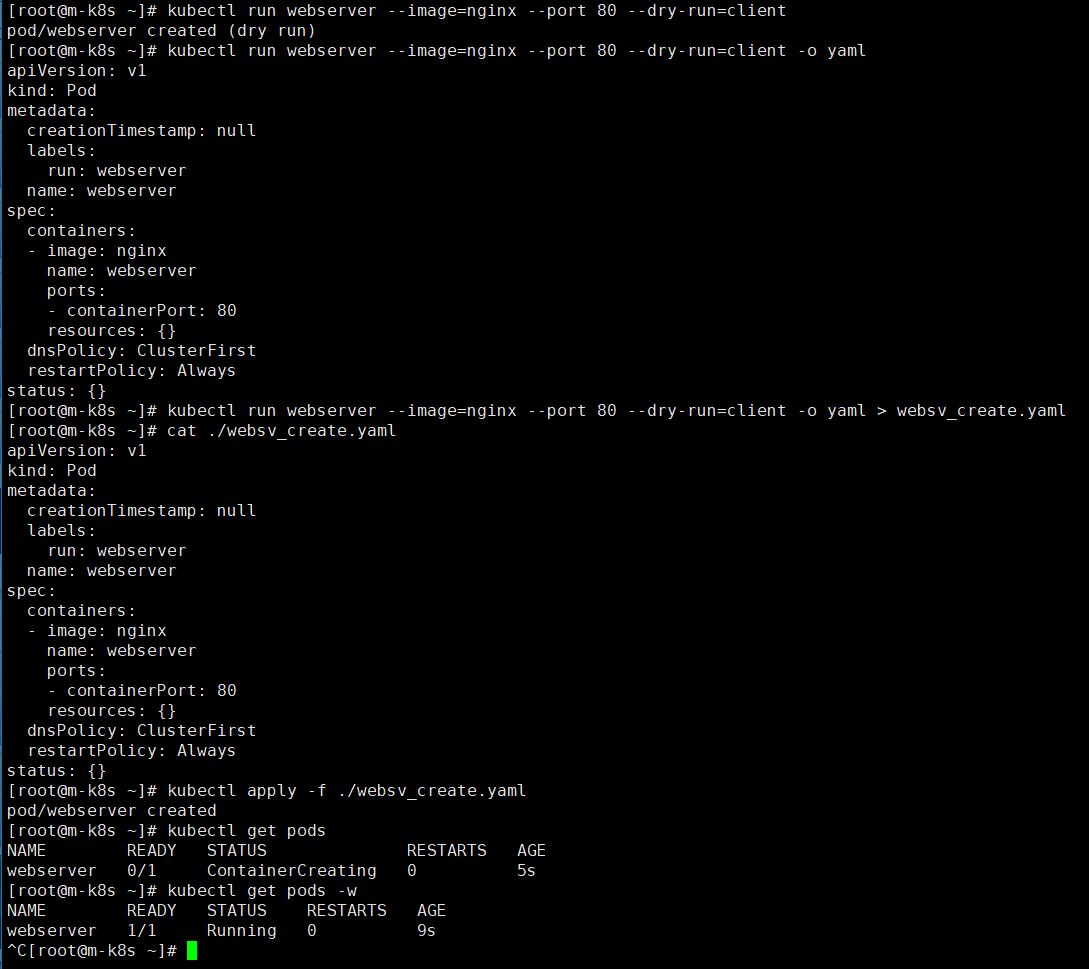
실행가능 상태만 확인

  • # kubectl run webserver --image=nginx --port 80 --dry-run=client

지정된 yaml파일로 출력하여 확인

  • # kubectl run webserver --image=nginx --port 80 --dry-run=client -o yaml

지정된 yaml파일에 출력하여 확인

  • # kubectl run webserver --image=nginx --port 80 --dry-run=client -o yaml > websv_create.yaml

yaml파일을 이용하여 pod 생성

  • # kubectl apply -f ./websv_create.yaml
  • # kubectl create -f ./websv_create.yaml


port-forwarding 테스트

port forwarding 테스트

  • # kubectl port-forward webserver 80:80


Static Pod?

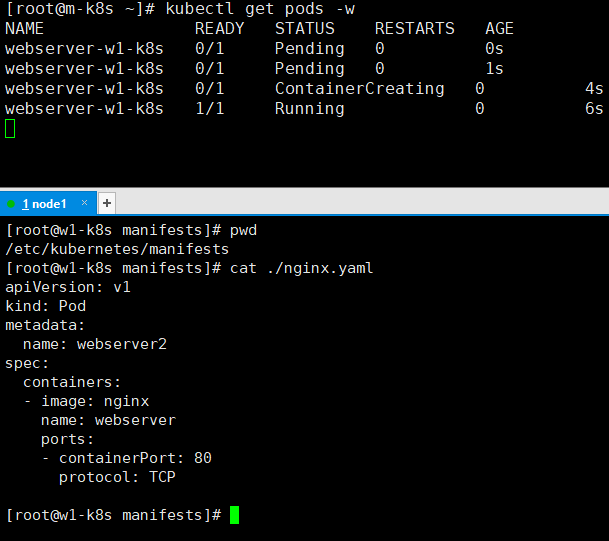
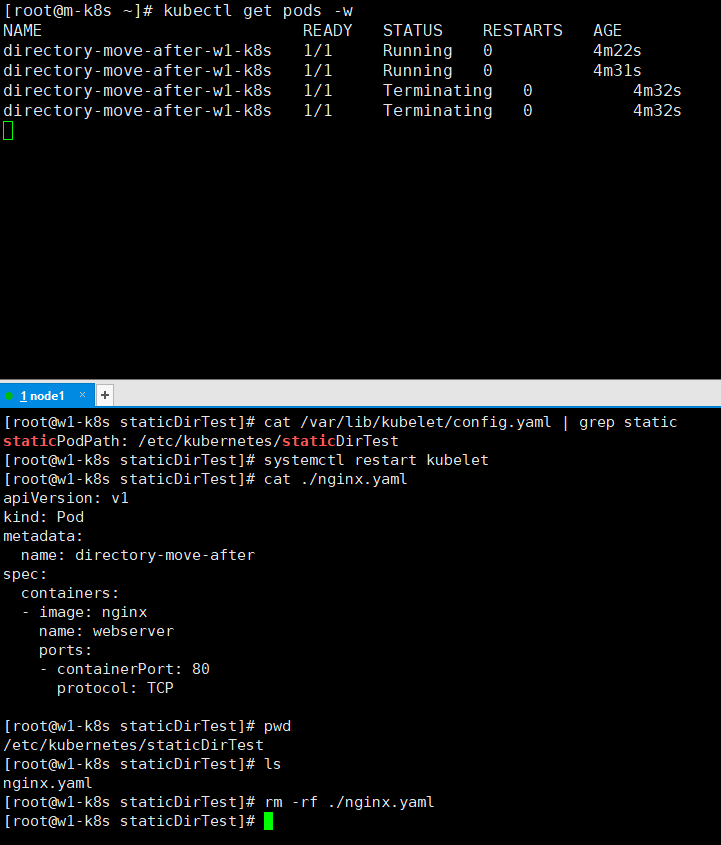
  • kubu-apiserver를 통하지 않고 kublet데몬에 의해서 직접 실행하는 pod
  • kube-apiserver를 통해서 pod를 edit할 수 없음
  • 용도
    • 주로 시스템 pod(kube-apiserver, etcd)를 살행하는 용도로 많이 사용
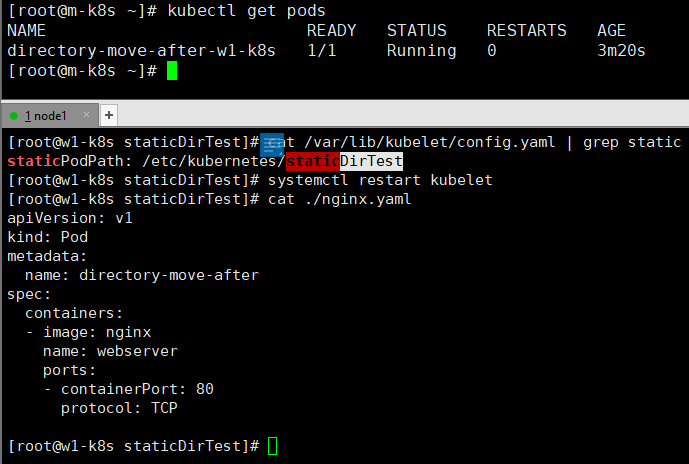
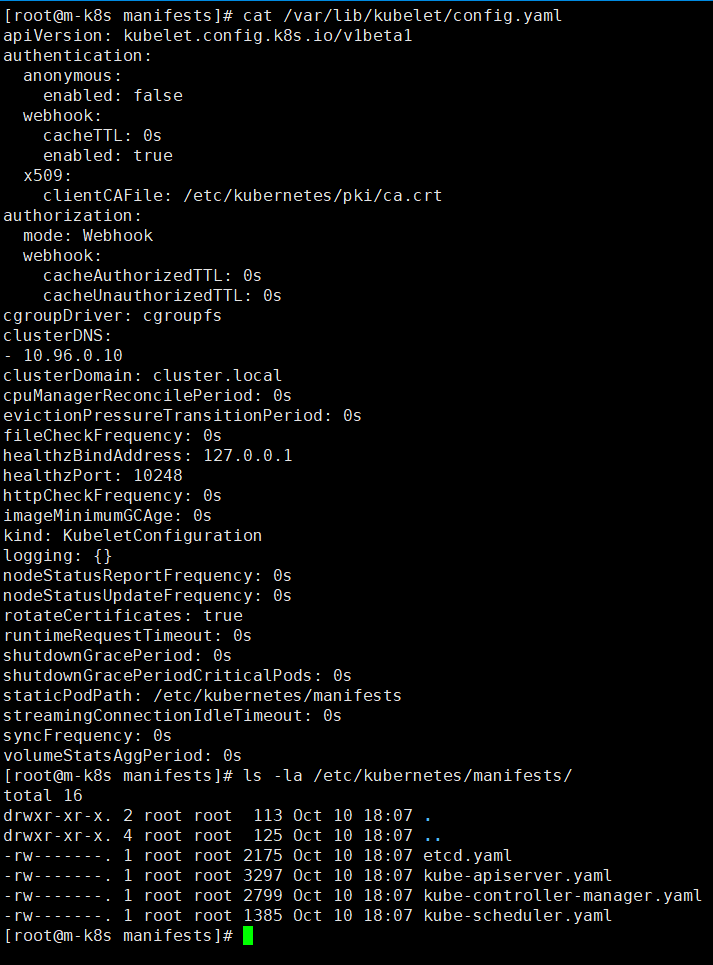
  • static pod 디렉토리 구성
    • /var/lib/kubelet/config.yaml

staticPodPath의 위치


static pod path에 yaml파일 생성

  • static pod를 생성할 node에서 staticPodPath에 yaml파일을 저장하면 kubelet daemon에서 pod를 생성


  • static pod path 변경
    • # systemctl restart kubelet
      • kubelet daemon 재시작


  • static pod path에서 yaml파일삭제
    • 해당 yaml로 실행된 pod가 삭제됨


  • master node에서 구동하는 시스템 pod들은 static pod 형태로 구동됨을 확인 할 수 있다


POD에 CPU/Memory 메모리 자원 할당

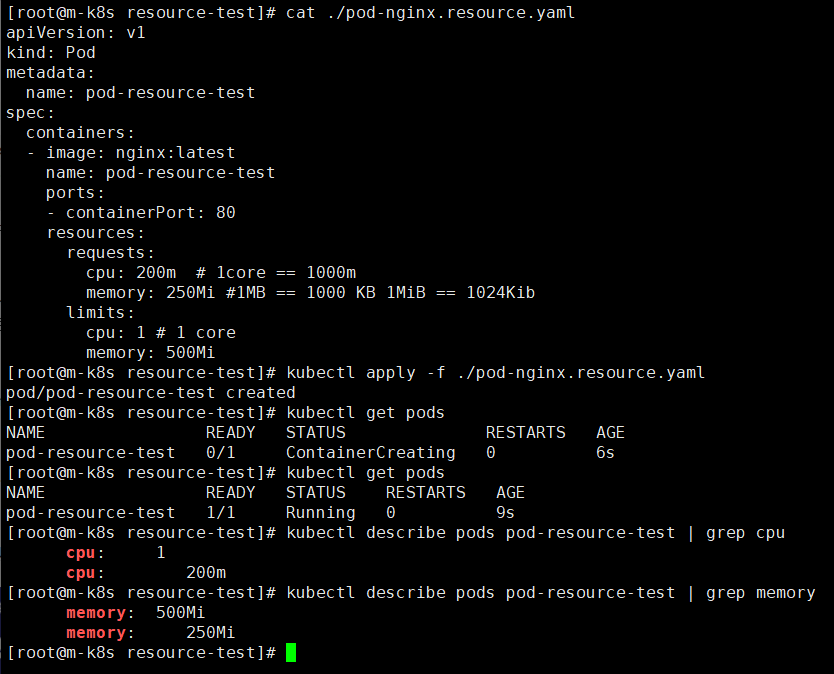
  • Resource limits
    • pod가 사용할 수 있는  최대 리소스 양을 제한
  • Resource requests
    • pod를 실행하기 위한 최소 리소스 양 요청
  • 메모리를 초과해서 사용되는 pod는 OOM kill되며 재스케줄링 됨

  • 리소스 request, limit 설정하여 pod 생성


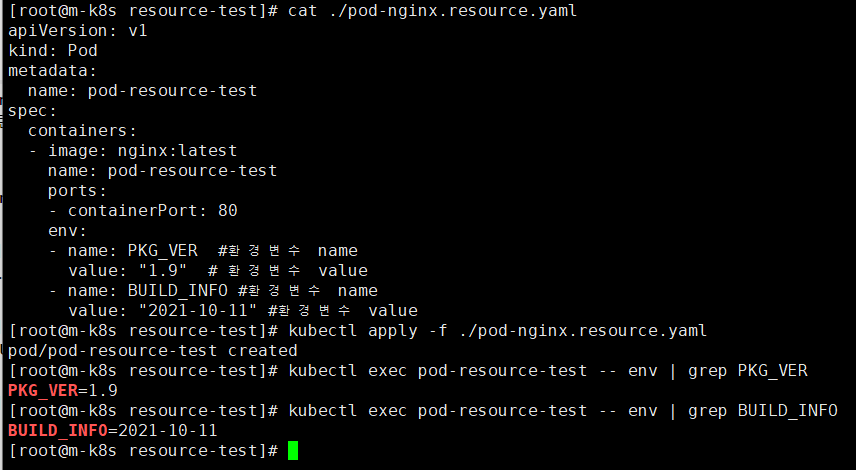
Pod 환경변수 설정

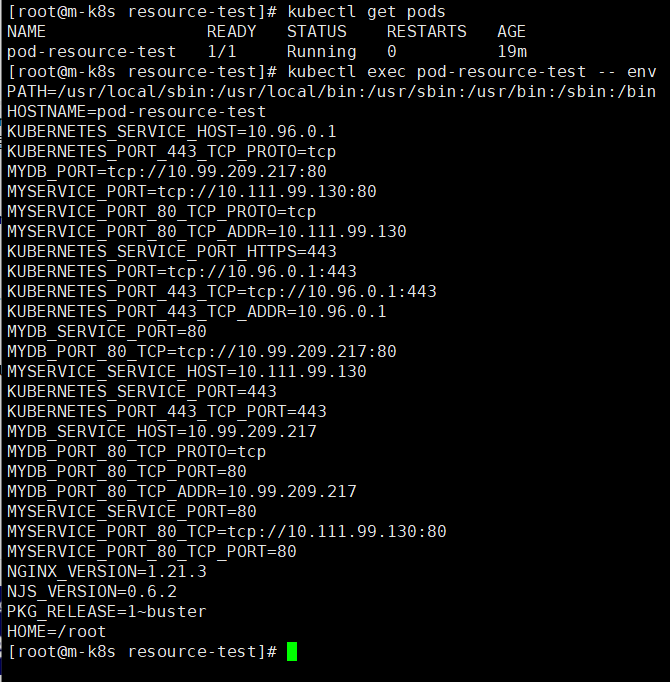
  • 외부에서 현재 pod의 환경 변수 조회
    • # kubectl exec {POD_NAME} -- env


  • 환경변수 설정


Multi Container?

  • Pod 1개에 다수 컨테이너 구조
  • 모두 노드 하나 안에서 실행
  • pod내 컨테이너들이 자원을 공유

kubernetes.io/ko/docs/tasks/access-application-cluster/communicate-containers-same-pod-shared-volume/


공유 볼륨을 이용하여 동일한 파드의 컨테이너 간에 통신하기

이 페이지에서는 동일한 파드에서 실행 중인 두 개의 컨테이너 간에 통신할 때에, 어떻게 볼륨을 이용하는지 살펴본다. 컨테이너 간에 프로세스 네임스페이스 공유하기를 통해 통신할 수 있는

kubernetes.io


apiVersion: v1
kind: Pod
metadata:
  name: multipod
spec:
  containers:
  - name: nginx-container
    image: nginx:1.14
    ports:
    - containerPort: 80
  - name: centos-container
    image: centos:7
    command:
    - sleep
    - "100000"

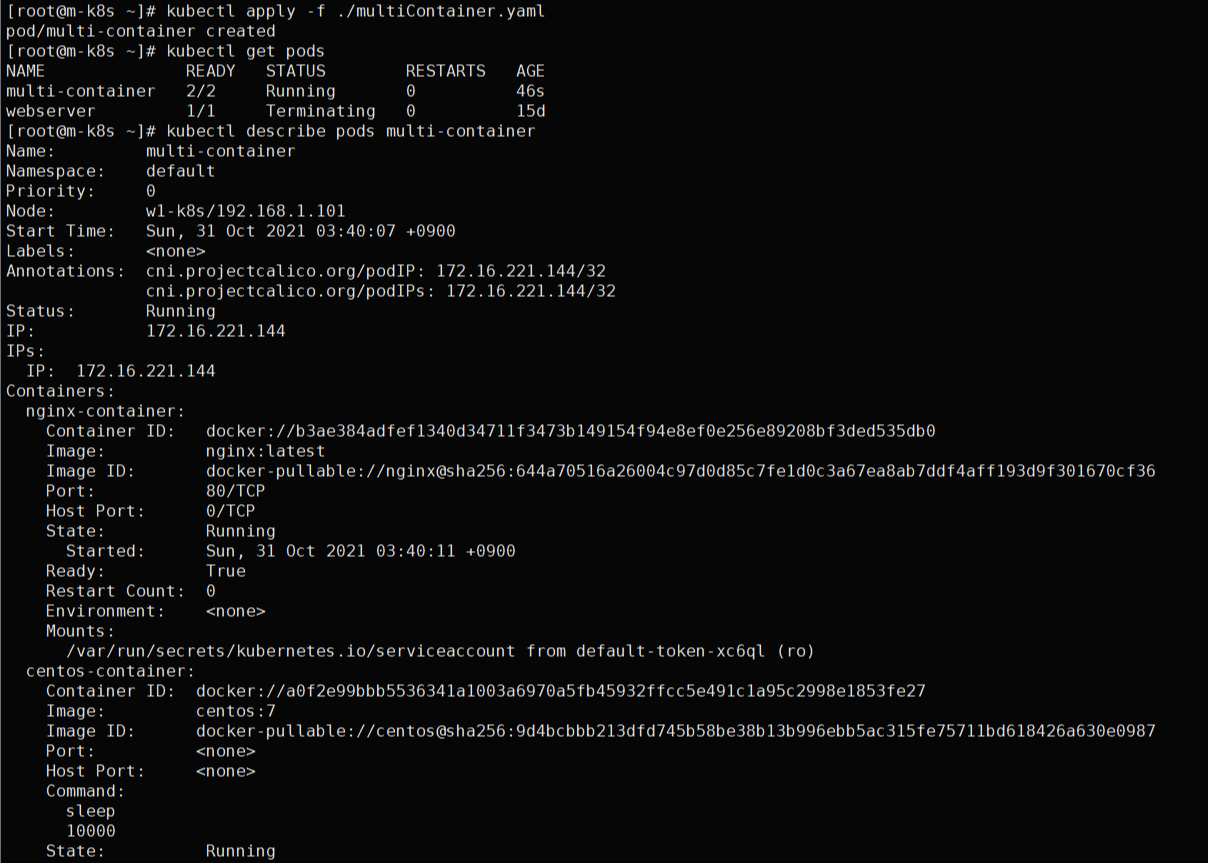
multiContainer.yaml 파일


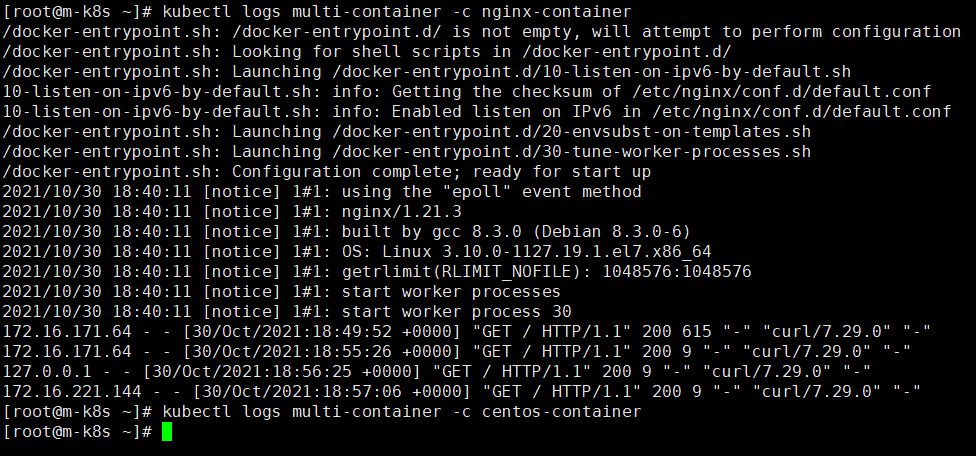
  • # kubectl describe pods multi-container
    • nginx-container, centos-container 2 container가 1개의 pod에서 running중임을 확인
  • # kubectl exec -it multi-container -c nginx-container -it -- /bin/bash
    • multi-container pod의 nginx-container container로 shell 접속


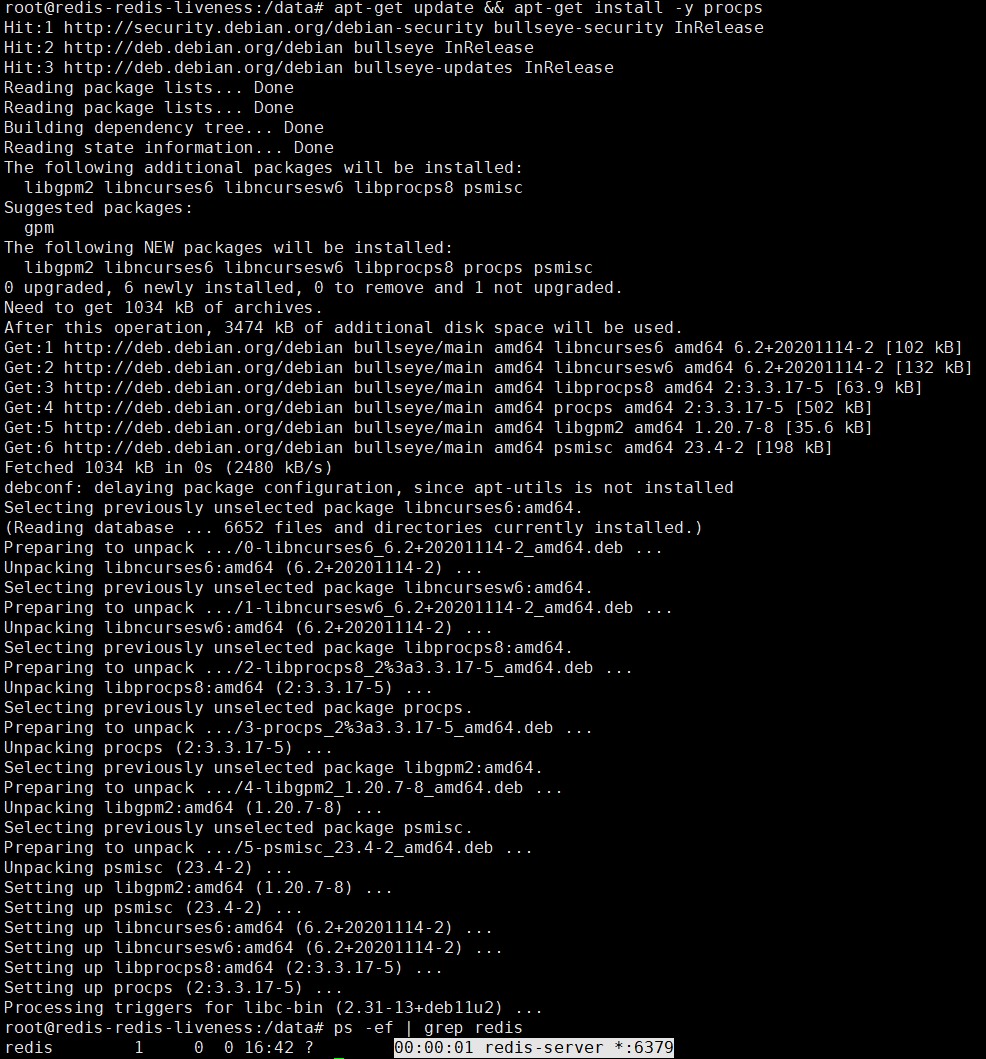
redis-server process 구동확인

  • # apt-get update && apt-get install -y procps


멀티컨테이너 로그 출력

  • # kubectl logs multi-container -c nginx-container
  • # kubectl delete pod --all
    • 현재 namespace의 모든 pod 삭제


init Container?

  • 메인 컨테이너가 구동하기전에 미리 동작시킬 컨테이너
  • 메인 컨테이너가 실행되기 전에 사전작업이 필요한 경우 사용
  • init 컨테이너를 포함한 pod는 init 컨테이너에 설정한 조건이 성공해야 메인 컨테이너를 구동시킬 수 있다.
  • init 컨테이너는 readinessProbe를 지원하지 않는다.
    • Pod가 모두 준비되기 전에 실행한 후 종료되는 컨테이너이므로(실제 서비스를 위한 컨테이너가 아니므로)

https://kubernetes.io/ko/docs/concepts/workloads/pods/init-containers/


초기화 컨테이너

이 페이지는 초기화 컨테이너에 대한 개요를 제공한다. 초기화 컨테이너는 파드의 앱 컨테이너들이 실행되기 전에 실행되는 특수한 컨테이너이며, 앱 이미지에는 없는 유틸리티 또는 설정 스크

kubernetes.io


init Container 테스트

apiVersion: v1
kind: Pod
metadata:
  name: myapp-pod
  labels:
    app: myapp
spec:
  containers:
  - name: myapp-container
    image: busybox:1.28
    command: ['sh', '-c', 'echo The app is running! && sleep 3600']
  initContainers:
  - name: init-myservice
    image: busybox:1.28
    command: ['sh', '-c', "until nslookup myservice.$(cat /var/run/secrets/kubernetes.io/serviceaccount/namespace).svc.cluster.local; do echo waiting for myservice; sleep 2; done"]
  - name: init-mydb
    image: busybox:1.28
    command: ['sh', '-c', "until nslookup mydb.$(cat /var/run/secrets/kubernetes.io/serviceaccount/namespace).svc.cluster.local; do echo waiting for mydb; sleep 2; done"]

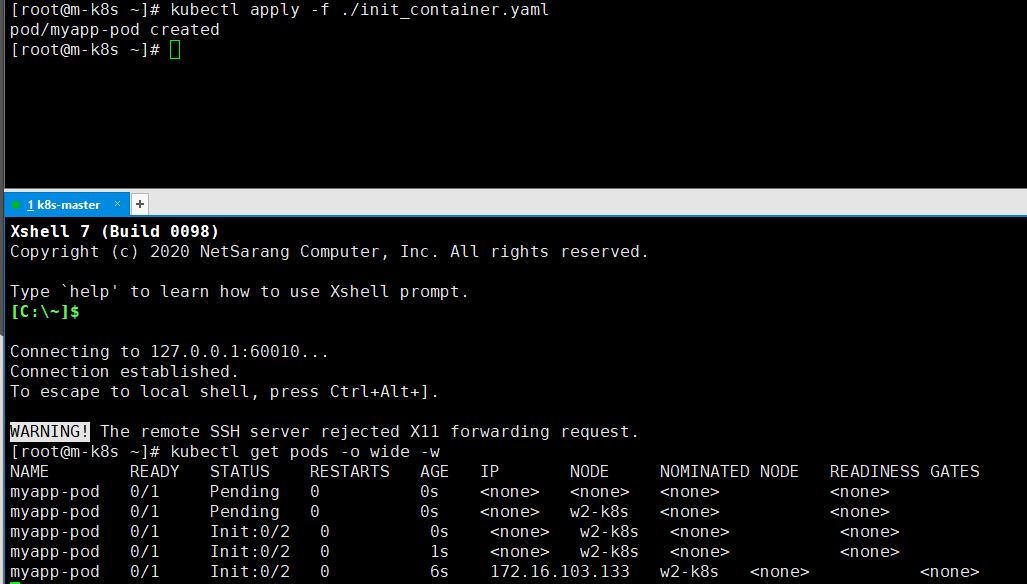
  • # kubectl apply -f ./init_container.yaml
  • init Container가 성공해야 메인컨테이너가 구동 할 수 있다.
    • init Container가 전부 성공할때까지 대기


---
apiVersion: v1
kind: Service
metadata:
  name: myservice
spec:
  ports:
  - protocol: TCP
    port: 80
    targetPort: 9376
---
apiVersion: v1
kind: Service
metadata:
  name: mydb
spec:
  ports:
  - protocol: TCP
    port: 80
    targetPort: 9377

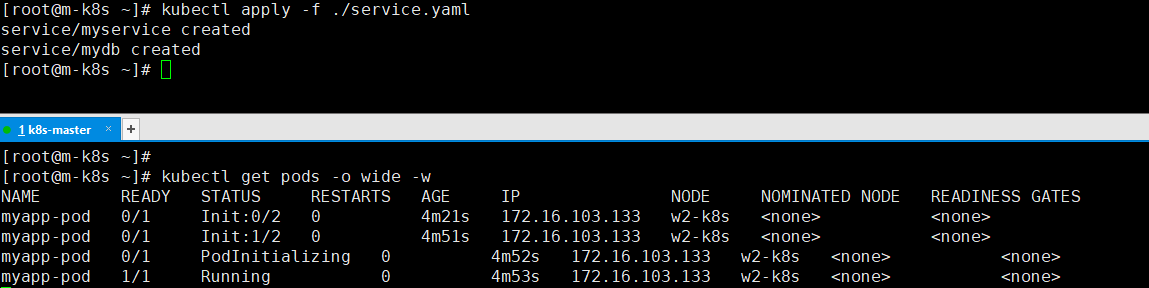
  • # kubectl apply -f ./service.yaml
  • 각 init 컨테이너가 대기하는 2개의 service를 생성
    • 메인 컨테이너가 Running 상태로 변함을 알 수 있다.


infra Container(Pause)?

  • pod당 1개 생성되는 컨테이너
  • PID 1로 설정되며 다른 컨테이너의 부모 컨테이너 역할
  • 역할
    • Pod에 대한 인프라(IP, hostname등) 네트워크 리소스를 관리하고 생성


infra Container 테스트

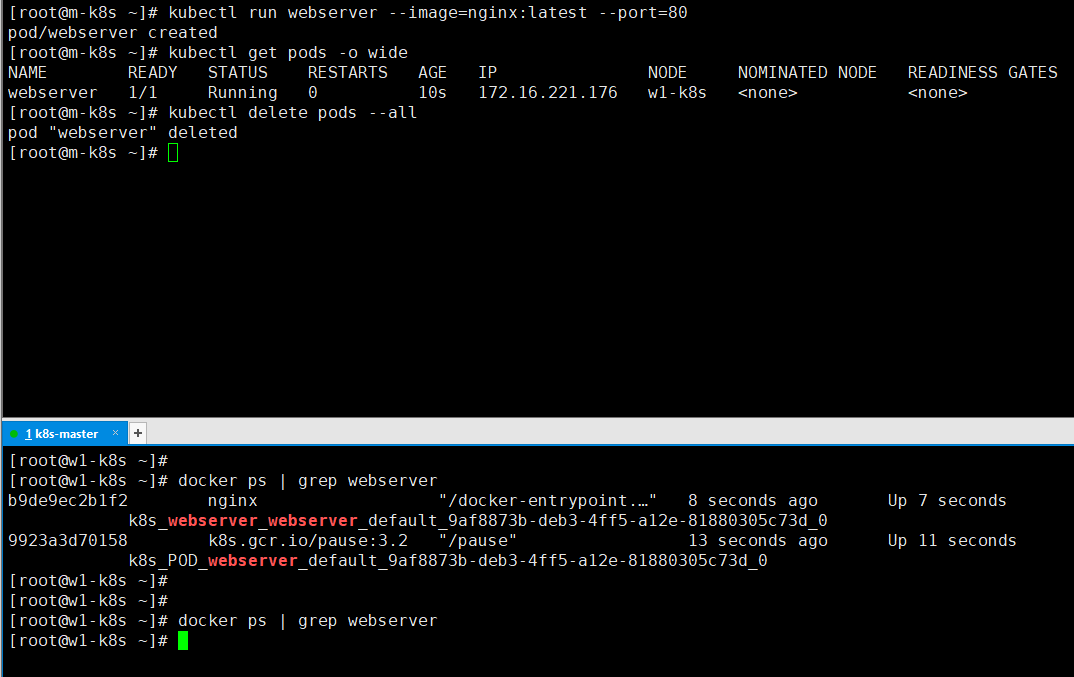
  • work node에서 컨테이너 조회
    • pod가 1개 생성될때 1개의 pause 컨테이너가 같이 생성됨을 확인 할 수 있다
  • pod가 삭제될때 해당 pod의 pause 컨테이너도 같이 삭제됨을 확인 할 수 있다

'클라우드 > K8s' 카테고리의 다른 글

K8s namespaces  (0) 2022.03.17
K8s Pod 구성패턴  (0) 2022.03.17
K8s 동작원리  (0) 2022.03.17
Single Master K8s 설치 및 기본 명령어  (0) 2022.03.17
Kubernetes?  (0) 2022.03.17

도커란?

 컨테이너 가상화 환경에서 애플리케이션을 관리하고 실행하기 위한 오픈소스 플랫폼


Kubernetes?

컨테이너 오케스트레이션 시스템


kubernetes는 왜 필요한가?

실제 상용서버를 운용하기에 부족한부분이 존재

  • 보통 상용서비스에서 서버 한대만 사용하지 않음
  • 여러 대 서버에 컨테이너를 배포하는 전체 과정을 수동으로 제어해야함
  • 서버에 장애가 발생했을 때 해당 서버의 컨테이너를 다른 서버로 옮기는 작업도 수동으로 해야함

k8s는 상용서버들을 클러스터로 구성하여 이러한 부분들을 자동화하므로 시스템 운영을 쉽게 한다.


컨테이너 계층구조

컨테이너 계층구조


K8s 특징?

  • 워크로드 분리
  • 어디서나 실행가능 - on-premise, public cloud(AKS, EKS, GKE등)
  • 선언적 API
    • 각 요소가 추구하는 상태를 선언하면 현재 상태와 맞는지 점검하고 그것에 맞추려고 노력하는 구조


kubernetes cluster architecture

  • 마스터 노드 : 전체 쿠버네티스 시스템을 관리하고 통제하는 쿠버네티스 컨트롤 플레인을 관장
  • 워커 노드 : 실제 배포하고자 하는 애플리케이션 실행 담당

'클라우드 > K8s' 카테고리의 다른 글

K8s namespaces  (0) 2022.03.17
K8s Pod 구성패턴  (0) 2022.03.17
POD  (0) 2022.03.17
K8s 동작원리  (0) 2022.03.17
Single Master K8s 설치 및 기본 명령어  (0) 2022.03.17

+ Recent posts